
Wednesday, September 5, 2012


Quick Keys Sept 5
QUICK KEYS
(B) Brush
( [ ]) Brush Size
(Command + Delete) Fill with background color
(Option + Delete) Fill with foreground color
(W) Magic Wand
( Space bar ) Active hand tool
( Command + or -) Zoom in or Zoom Out
(Command + A) Select All
(Command + C) Copy
(Command + V) Paste
(Command + D) Deselect
(Command + T) Transform
(B) Brush
( [ ]) Brush Size
(Command + Delete) Fill with background color
(Option + Delete) Fill with foreground color
(W) Magic Wand
( Space bar ) Active hand tool
( Command + or -) Zoom in or Zoom Out
(Command + A) Select All
(Command + C) Copy
(Command + V) Paste
(Command + D) Deselect
(Command + T) Transform
Wednesday, August 29, 2012


Wednesday, June 6, 2012
FINAL
We meet both days Monday June 11 and
Wednesday June 13 7:30am-10:00am
WRITTEN PART ON MONDAY
NOTEBOOK DUE WITH LABEL ASSIGNMENT ON MONDAY
Notebook / Exercises / Creative Brief
Notebook due Monday June 11
• Print and place in notebook all Illustrator Exercises.
• Print all examples of labels in black and white and place in notebook.
• Add anything you think related to Graphic Design to notebook.
• Type up creative brief and place in notebook.
• Label Assignment place in notebook.
Five Questions to Answer Creative Brief
• Print and place in notebook all Illustrator Exercises.
• Print all examples of labels in black and white and place in notebook.
• Add anything you think related to Graphic Design to notebook.
• Type up creative brief and place in notebook.
• Label Assignment place in notebook.
Five Questions to Answer Creative Brief
- Background — what is the background of the project? Why is it being done?
- Target audience — what do they already think about this subject? Is there anything that should be avoided?
- Objectives — what is to be accomplished? How will this be measured and success understood?
- Single message — what is the one thing to tell the audience? What is the single thing they should remember about the offering? How will they believe what we say?
- Mandatory elements — mandatory elements such as the client's logo, address, phone number and so forth.
- Deliverables — what is to be used to give the audience the message? What is the best way or place to reach this audience?
Wednesday, May 23, 2012


Monday, May 21, 2012

Monday, May 14, 2012

Wednesday, May 9, 2012
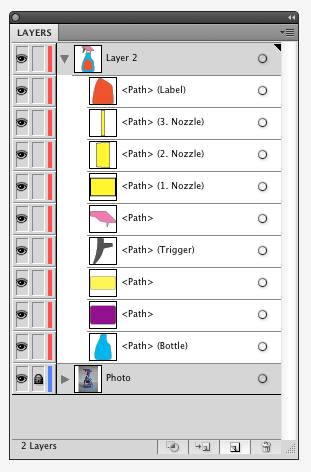
LABEL ASSIGNMENT (BOTTLE)
Bezier Curve
Point
Control Arms
Vector
KEY QUICK KEYS
Direct selection (A)
Selection (V)
Pen (P)


Wednesday, May 2, 2012
Monday, April 30, 2012
Poster 8 Demo Texture
Readings on Texture
Page 48 (White Space is not Your Enemy)
Page 148-153 (Design Elements)


Page 48 (White Space is not Your Enemy)
Page 148-153 (Design Elements)
LAYERS & EXAMPLE


Subscribe to:
Posts (Atom)